An Internet connected home/home office network, consists of a variety of hardware and software components.
In this tutorial we look at the various components that you need to create a home network and connect it to the Internet.
At the end of the tutorial you should understand what devices are required to create a home network and what functions they serve.
You should also understand the Internet services that are essential for connecting to and using a home network and the Internet.
Internet Connection Components and Functions
The diagram below shows a typical home or small office network layout.
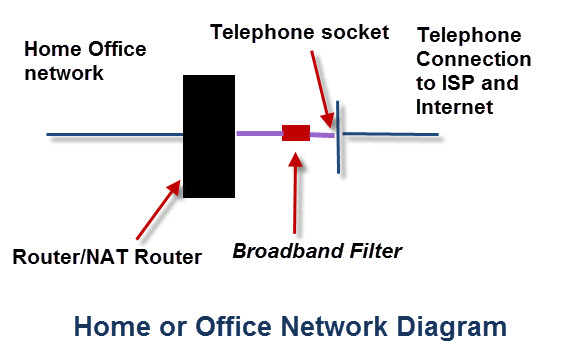
DSL Modem–
This converts digital signals into analogue signals that are suitable for sending over a telephone line. It is usually built into the Internet/broadband router and not normally purchased as a separate component.
DSL/Broadband Filter
Used to filter out DSL signals from telephone signals so that you can access the internet and use the telephone simultaneously.
Firewall and NAT Router
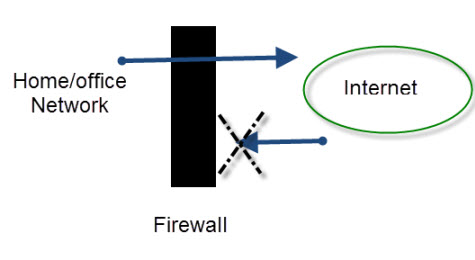
A firewall functions like a router except that it blocks traffic from the external network according to user configured rules.
A firewall protects your home/small business network computers and devices from intruders on the Internet.
It effectively acts like a one way digital gate blocking access to your network from devices on the Internet, but at the same time allowing devices on your network to connect to devices on the Internet. (schematic below)
Small networks use a firewall/NAT router combination in which a single device acts as a NAT router and firewall.
NAT effectively isolates your home network from the Internet.
See Port forwarding and Internal and external IP Addresses.
Computer Firewalls –
If you are using Windows XP (or above) then you also will have firewall on your computer.
This firewall is less secure than the one built into your router/hub but it is normal to leave it enabled on your computers.
When you install applications e.g. Skype you will find that they change the firewall settings.
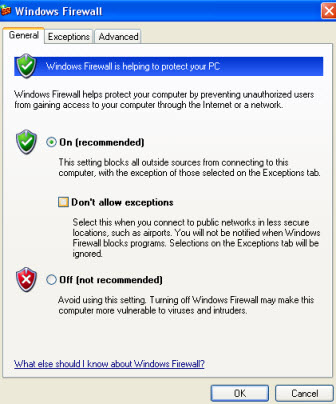
Here is a short video explaining how the computer firewall works.
ICS (Internet Connection Sharing)-
Internet connection sharing allows you to share an Internet connection with other computers on a Local/home Network.
It requires that one computer be designated as the sharing computer (the computer with the Internet connection).
This computer functions effectively as a NAT Router, and must be left switched on for the other computers to access the Internet.
This configuration is not normally used anymore.
General Networking Hardware Components and Functions
Hubs,bridges and switches are all devices used to connect computers and other devices together on an Ethernet network.

Network Hub
A hub connects two or more computers together (like switch in diagram above).
Hubs are effectively multi port repeaters and operate at the physical layer (level one). They do not examine the network traffic. They are being replaced today by the switches. Smallest is usually 4 port.
Network Bridge
A bridge connects two network segments together and is a selective repeater. It examines the MAC address of the traffic it sees and learns which network segments contain the various MAC address.
It uses this information to decide whether or not to repeat the traffic on a network segment.
A Bridge works at level 2 (data link Level) and will transmit broadcasts.
Bridges are also being replaced by switches
Network Switch
A switch Connects two or more computers together and used today in preference to a hub or bridge.
Like a bridge a switch learns about MAC address connected to each port and will only send data on that port that is addressed to those MAC addresses.
A switch is effectively a bridge with more ports.
Using switches usually speeds up a network but it depends on the network configuration. See the Basic networking Course
There are various types being sold marketed as unmanaged,managed and smart.
A basic unmanaged switch requires zero configuration. You just insert it into the network.
A managed switch gives you full control of the switch and usually out of the box behaves like an unmanaged switch. You can however control the switch,configure the Ports etc. These types are not normally used on home networks due to the complexity and there being little need.
A smart switch is somewhere in between a managed and unmanaged and is found on home networks requiring VLANs.
Many people get confused between routers and switches. If you are still unsure of the difference see routers vs switches.
POE Switch
Many modern switches provide POE ports. This allows you to power devices. like cameras. directly from the switch without the need of an external power supply on the camera. See POE explained for beginners
Wireless Access Point
A wireless access point connects wireless devices to an Ethernet network, and to each other.It effectively does the same job as a hub/switch but for wireless devices.
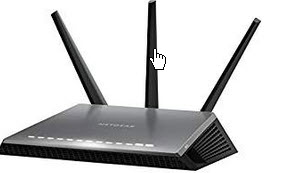
Many Access points can be powered using POE (Power over Ethernet) which means that they can be placed in positions where there is no mains connection making them very flexible. See POE explained for beginners
PoE Injector
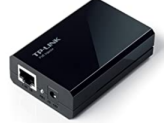 These are used to connect a PoE end device to a non PoE device like a legacy switch. The legacy switch cannot provide the power so the injector does.
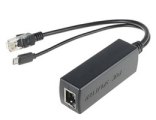 PoE Splitter – This Splits the data from the power and is used to connect a non PoE end device to PoE source.
The power extracted by the splitter is often used to power the device using a separate power input.
The one shown is the DSLRKIT Active PoE Splitter used to power the Raspberry Pi.
Home Routers
A router connects networks together. Routers operate at the networking level of the TCP/IP protocol stack.
On Home networks the router is responsible for connecting the home network to the Internet and provides several important networking services like:
- DHCP
- DNS
Most home routers provide both Wi-Fi and Ethernet connections.
Home routers also provide NAT (Network Address translation) services.
They are also commonly known as hubs but this doesn’t actually describe their networking role.
Home Router Internet Connection Types
A router connects two networks together.
In the case of an home router the networks are the Internet and the home network as shown in the diagram below.
There are four main Internet connection types in use
- ADSL – old
- VDSL – Used with Fibre to cabinet connections (FTTC)
- Fibre – Used with FTTP
- Cable – Cable networks
If you purchase your own router then you need to ensure it is the correct type for your Internet connection.
Routers and Modems and Filters
If you look at the internet connection diagram above you will see a broadband filter.
This filter is necessary on ADSL and VDSL connections, but is now commonly included in the ISP socket.
However you will need to check your socket type to determine this.
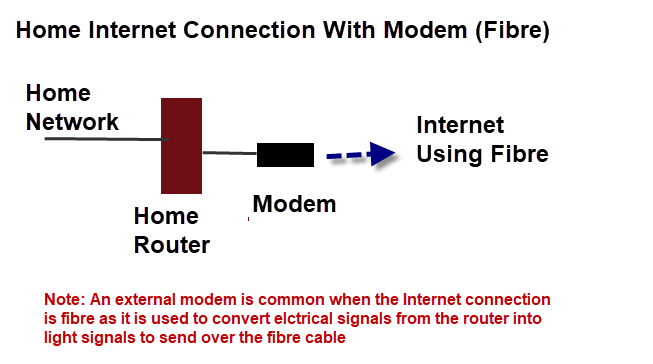
What isn’t shown is a modem.
A modem, if required, is placed between the router and the internet connection.
External modems are commonly found on Networks that connect using fibre, and are required to convert electrical signals from the router into light signals to send over the fibre cable.
VDSL and ADSL
Internet connections that use telephone cables to connect to the Internet use these link protocols or technologies.
ADSL (Analogue digital subscriber line) is the older technology, and is now being replaced by VDSL (very high speed digital subscriber line) which is faster.
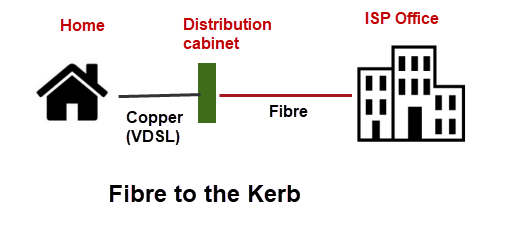
VDSL isn’t fibre, but it is used in conjunction with fibre in what is know as fibre to the kerb connections.
In these connections the fibre is provided to a distribution point near the home, and the standard telephone lines provide the connection to the home using VDSL.
Home Routers Without a Land Line
Traditionally Internet connections have required a land line connection.
However more and more people are not using a traditional land line phone connection, but a mobile phone.
There are many home routers on the market that support 3G and 4G mobile networks.
They were originally designed for use by mobile workers or people on holiday that required to share a mobile Internet connection.
Usually they provide a Wi-Fi access point and Ethernet connections just like a traditional home router but the connection to the ISP is via the mobile network as shown below.
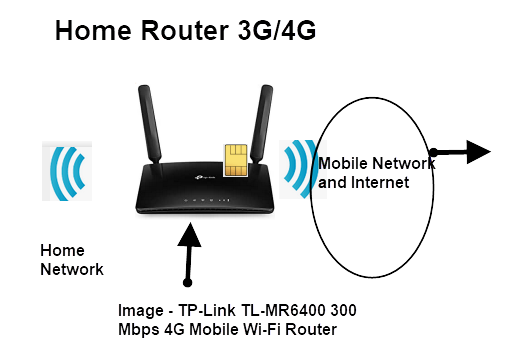
Before you purchase one for home use you should check the network availability in your area.
The upload and download speeds are generally slower than land line with 3G giving between 200kbps and 7.2Mbps.
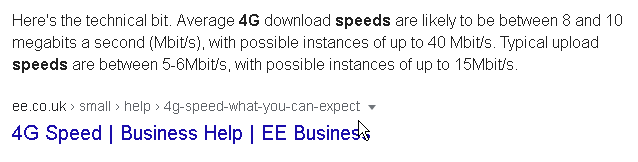
4G giving 8-10 Mbits/s (quoted speeds) in the UK but published speeds are much higher with 4G having maximum download speed of around 160Mbits/s.
Here is a screen shot from the ee mobile provider.
See Mobile routers for more details
Dual Routers (VDSL/ADSL/Fibre) + Mobile
Many routers now provide two Internet access methods for redundancy purposes and are increasing popular with the current work at home trend.
The main connection is usually VDSL/ADSL or fibre but when this fails it will fall back to the mobile connection automatically.
Providing two internet connection methods on a home is also possible using a standard home router and standalone 3G/4G router but in this case you would need to make changes to you client to use the 3G/4G connection as it wouldn’t be automatic.
Wi-Fi Range Extender/Repeater
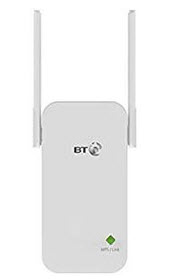 Place in range of the existing Wireless network, and it will take the signal from the network and rebroadcast it, thus increasing the range of the network.
Modern ones plug directly into a mains socket and require no other connections.
Note: see Wi-Fi homeplug adapters below.
Mi-Fi -BroadBand Wi-FI Hub
A Mi-Fi Hub is a relatively new device, and it can be used for connecting multiple devices to the Internet over the mobile network (3g and 4G).
Your devices connect to the hub using Wi-Fi and the Hub connects to the mobile network using 3G/4G .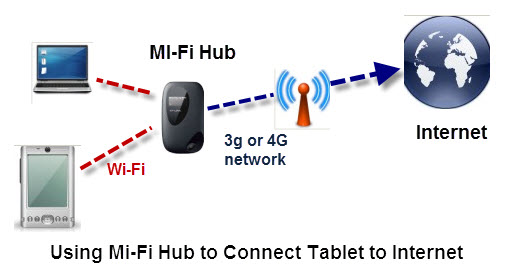
Mi-Fi hubs are low cost ( around £20 to £40) and many will work hours without being connected to the mains.
You will need a Sim and a mobile data plan.
Homeplug Adaptor
These are Ethernet cards that plug directly into a mains socket, and use the mains wiring to carry the Ethernet signal instead of using UTP cable.
They come in pairs and you need a minimum of 2 adapters.
They plug into the mains and have an Ethernet socket that you can use to connect to a computer,switch , router etc.
You can also get ones that function as Wireless Access points which are used for extending a networks to overcome range limitations of Wi-Fi.
These look like a normal homeplug adapters but have a wireless access point built in.
See Homeplug adaptors and Powerline networking and extending a home network.
Wi-Fi Range Extender/Repeater vs Wi-Fi Homeplug
A Wi-Fi range extender needs to be in range of an existing Wi-Fi network to work.
A Wi-Fi homeplug adaptor needs to be connected to another homeplug adapter using the electrical mains.
Wi-Fi homeplug adaptors give you much better performance than range extenders.
UTP (Unshielded Twisted Pair) Cables
Common cable for connecting Ethernet devices together.Ranges from CAT5 to CAT6.
Older Installations will use CAT5 and newer ones CAT6, which is designed for higher speeds.
Here is a good video covering the differences between UTP and STP, straight vs crossover, and the different categories.
Wiki On cat6 cable and cat 5.
See How to Wire your Home Network
Ethernet Crossover Cable
Used to connect two computers together without requiring a hub/switch.
It is also used for connecting older hubs/switches in cascade. Not normally required today as the newer hubs/switches use auto detect and can switch modes.
See Wiki on Ethernet crossover cable and Medium dependent interface
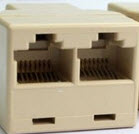
Cable Coupler/Extender and Splitter
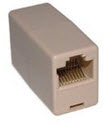 Low cost and very useful for joining Ethernet cables together.
Simply Plug an Ethernet cable into each socket.
You can also use an Ethernet splitter to extend a cable, and provide more Ethernet sockets,
Connector are RJ45
Useful Resources:
How to wire your own home network PCworld tutorial and This video
Common Networking Terms and Acronyms
MAC Address – The 64 bit Physical address of the device which is assigned to the Wi_fi adapter or NIC. Cannot normally be changed.
NIC– Network Interface card. Ethernet card found in computers
UTP- (Unshielded twisted pair)- Common cable for connecting network devices.
RJ45- Connector used for connecting Ethernet devices.
RJ11– Connector used for connecting telephones,modems etc in USA and adopted in other countries.
Gateway – A gateway works at the application level of the TCP/IP protocol stack and does a translation. Examples are email to FAX gateways.
On earlier networks and in earlier networking courses routers were called gateways, and the term is still used when setting up networking clients.
In this context the term gateway refers to the gateway to an external network i.e. the Internet.
Uni-cast Message – Message sent from one device to another.
Multicast Message -Message sent from one device to several others.
Broadcast Message -Message sent to all nodes on the network.
Quick Quiz
Q1 – Which device is not required to connect to the Internet connection?
- Router
- Modem
- Switch
Q2-Which of the following components is not required for a home network?
- Router
- Switch
- Wireless Access point
- Ethernet crossover Cable
Q3 -What hardware is essential to creating a home wi-fi network?
- Router
- Switch
- Wireless Access point
- Ethernet crossover Cable
Q4 -A gateway is a common network hardware component that does what?
- Connects several computers together.
- Resolves names to IP addresses
- Assigns IP addresses
- Connects a network to the Internet.
Q5 – What device is essential to connect to the Internet?
- Router
- Switch
- Wireless Access point
- Ethernet crossover Cable
Related Articles
- Guide to Internet Connections and Access Methods
- Wi-Fi and Wireless Networking
- How Networks work beginners course
- Building a Home Network
- Home Network Troubleshooting
- Home Networking Topologies
Answers
Q1-A switch.
Q2- Ethernet crossover Cable
Q3 -Wireless Access point
Q4- Connects a network to the Internet.
Q5 – A router
Thanks for all the info. joanne
WOW! IT HAS HELPED ME DO MY COURSE WORK FOR ‘DATA COMMUNICATION’ AS A COURSE UNIT
It is very useful as I intend to start dealing in networking hardware