 Home wireless networks that connect your tablet,PC and smart phone to your home network and the Internet use Wi-Fi..
Wi-Fi is a wireless standard used on both home and public wireless networks worldwide. (WLAN)
Quick Links
- Wi-Fi Advantages and Disadvantages
- Wi-Fi Standards and Speeds
- Wi-Fi Connection Modes
- Wireless Network Installation
- How to Secure a Home Wireless Network
- Common Home Wi-Fi Devices
Home Wireless Networks -Advantages and Disadvantages
Wireless networks are generally cheaper,quicker and easier to set up than wired networks as there are no cables to run.
It is also easier for new devices to join the network as they don’t need to locate a physical access point.
It is for these reasons that Wi-Fi is the main access mechanism, used in home and small office networks.
However Wi-Fi is generally slower than most wired Ethernet systems, but when the main use is Internet access then this makes no real difference as usually the Internet connection becomes the limiting factor. See Understanding Internet speeds and speed testing.
Wi-Fi Standards and Speeds
Wi-Fi uses the IEEE 802.11 family of standards.
A letter is added to the end to indicate the version so we have -802.11a,802.11b etc.
A typical wireless access point using 802.11b or 802.11g with a stock antenna might have a range of 32 m (120 ft) indoors and 95 m (300 ft) outdoors.
The newer IEEE 802.11n, however, can exceed that range by more than two times (Wikipedea on wi-fi).
802.11b or 802.11g networks use the 2.4GHz carrier frequency while the newer 802.11n networks use the 5GHz frequency.
Devices that support both frequencies (2.4 and 5Ghz)are known as dual band ,and are useful when transitioning from old wireless networks to the newer networks.
Wi-Fi standards are backwards compatible so that if you buy a device that uses the latest Wi-Fi standard it will work on networks that only support an older standard.
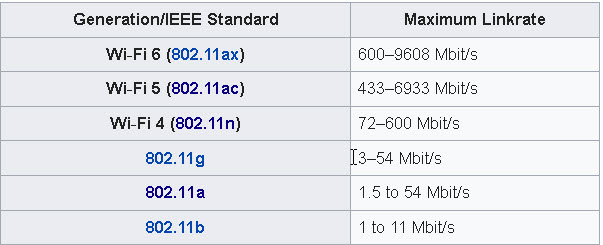
In 2018 the Wi-Fi alliance introduced a simpler naming scheme and 802.11n is now known as Wi-Fi 4.
In addition newer devices will also display this number along with the signal strength.
The table below shows the newer standards and their names (taken from wiki)
Wi-Fi Connection Modes
Wi-Fi supports three connection modes:
- Infrastructure mode
- Ad-hoc mode
- Direct mode
Infrastructure mode
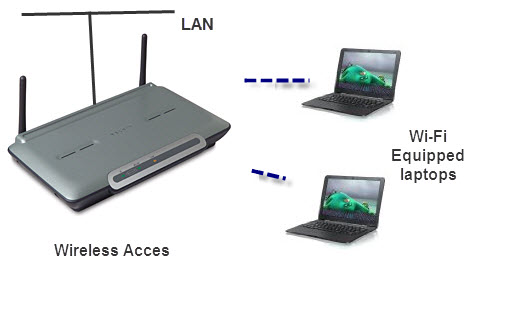
Infrastructure mode is the most common and it is the mode used in home/business and public Wi-Fi networks.
Infrastructure mode requires a Wireless Access point.
On home networks this is usually provided by a Wireless router.
The Access point forms the Wireless network, and all nodes or clients connect to the access point.
See Setting up a home network.
The access point, and network is identified by a SSID or service set identifier.
SSID’s are assigned by a network administrator and are usually given easy to remember and descriptive names.
Wireless access points usually broadcast this SSID so that connecting clients can connect to the correct network.
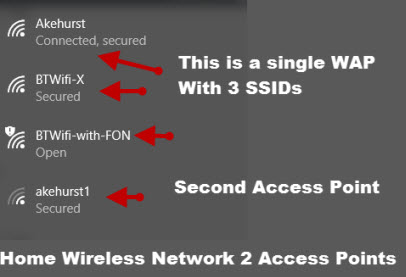
Depending on how it is configured a WAP (Wireless access points ) may broadcast multiple SSIDs.
The screen shot below shows my home network with 2 wireless access points. One of these access point broadcasts 3 SSIDs.
BSSIDs
A Wi-Fi access point also has a basic service set ID (BSSIDs) which is used to identify the access point and its clients on a network.
The BSSID is the MAC address of the access point. See this article for more details.
Wi-Fi Channels
A Wi-Fi access point is also configured to use a preset Wireless channel. Commonly used channels are 1,6,11. See Wiki
If you are responsible for setting up your home Wi-Fi access point /router then you would set up the access point to use a channel that isn’t being used by another access point in your location.
This is especially important if you live in a crowded location with lots of neighbours.
You can use wi-Fi test Apps to see what channels are being used in your location.
It is important to note that Wi-fi channels do not correspond to number of devices that can be connected to the access point.
Each channel corresponds to a frequency that the Wi-fi devices work on, so if your access point is set to use channel 11, then all devices that try to connect to it must also communicate on channel 11.
The number of actual devices that can connect on a given channel is limited by the software on the router and by bandwidth.
Devices on a channel share the channel in a similar fashion to clients on Ethernet networks.
That is each device takes turns sending and receiving data on the channel. (Time slot multiplexing).
Therefore the more clients that are connected the slower each client runs.
This forum discussion goes into more detail.
Many Wi-FI Access points will self adapt.
Wi-Fi Bands -Dual Band
Most home networks (802.11b or 802.11g) and devices use the 2.4GHz frequency band while the newer networks (802.11n) use the 5GHz frequency band.
Most new 802.11n devices support both bands and are known as dual band.
Because of the limited support of the 5GHz band by devices this band is generally quite clear.
It also has more channels available.
The 5GHz band is faster than the 2GHz band but has a shorter range and dooesn’t penetrate walls very well
Ad Hoc Networks
Conventional infrastructure mode relies on a access point through which all nodes on the wireless network communicate.
In addition a node can only be connected to one access point at a time.
With an Ad Hoc network nodes can communicate with each other without an access point.
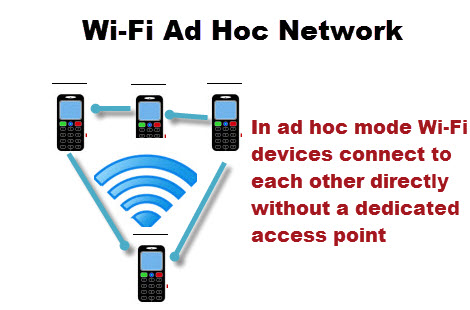
Ad Hoc Wi-Fi networks will become very important as mesh networking evolves.
Wi-Fi Direct?
Wi-Fi direct allows you to connect two Wi_Fi equipped devices together without requiring an access point.
Essentially it works the same ways as Bluetooth but is much faster and is designed to be used for the same type of applications.
Here is a video from the Wi-Fi Alliance that explains how it works.
Here is a very good article that explains ad-hoc and wi-fi direct in more detail
This Samsung support articles show how to connect wifi direct devices
Wireless Network Installation
Wireless network installation is very easy and just requires a Wireless access point (WAP).
On small home/office networks this in generally provided by the home router but can also be provided by other devices like a dedicated WAP and electrical socket etc see devices later.
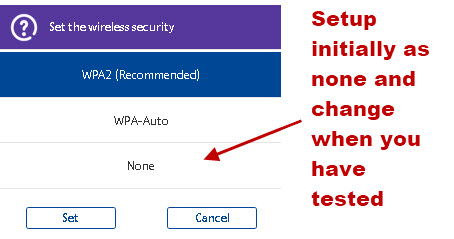
All that you really need to do on the wireless access point is to assign a network name (SSID) and setup security as covered below.
However for the initial installation I would recommend you only setup with no security and no encryption and test it with a single device before adding other security measures.
How to Secure a Wi-Fi Network
It is common for many home networks and business networks to only allow their own authorized devices to use their wireless network.
This is achieved by securing the network.
There are three common techniques available, which can be used either independently of each other, or together. They are:
- Broadcast SSID prevention
- Mac Address Restrictions
- Encryption
Broadcast SSID
Every Network has an identity or name known as the SSID (service set identifier).
They normally broadcast this ID so any wireless devices in the area know they are there.
The client device will see a list of networks listed by name, and he can select the network from the list or enter the name in the network connection dialogue.
If the client device didn’t know the network name then it couldn’t connect.
You can prevent your wireless network from broadcasting the name by turning off Broadcast SSID.
The problem with turning off broadcast SSID is that anyone who wants to configure a wireless device to connect to your network will need to know the name in advance.
If, as in a typical home network, you only have a fixed number of client computers then you can set this up yourself.
If you are setting up a wireless network for a small business, hotel/guest house etc then you will need to have a way of letting new users easily find out the network name and you will also need to have a procedure for changing the name periodically.
You should note that although the SSID is not being broadcast it can easily be found by professional/knowledgeable eavesdroppers using specialist equipment.
Comment
Therefore it isn’t considered to be a very powerful security option and is seldom used.
Mac Address Restrictions
This is a very powerful security feature that limits access to your wireless network to particular devices.
Every device connected to a wireless network has a MAC (media access control) address.
The address is in effect the address of the network adapter (wireless or Ethernet), and is assigned by the adapter manufacturer, and is unique.
To configure this you need to configure each wireless access point to only allow communication from a specified addresses. To setup Mac Address filtering/restrictions you need to:
- Find the MAC address of each device (computer/laptop).
- Enter these addresses in the list of allowed addresses on the Wireless access point/router. If you have multiple access points then each needs to be configured.
Because of the need to find each MAC address for each device then this technique is unsuitable for environments were the client machines that connect to your Wireless Network change i.e. hotel, public network etc.
If you do have a static network of machines then this is recommended.
You should also bear in mind that the MAC address is on the network adapter, and so if your wireless USB adapter breaks, and you replace it with a new one, then this will have its own MAC address, and you will need to reconfigure your Access points.
You should also note that the MAC address can be spoofed by a professional/knowledgeable eavesdroppers using specialist equipment.
Comment
Not commonly done
Wireless Encryption (WPE and WPA)
Securing your wireless network using Wireless encryption techniques secures the data between your computer and the wireless access point.
This type of security makes it difficult for anyone to eavesdrop on the wireless signal or “steal” your Internet connection by connecting to your Internal network.
There are two method of encryption used in Wi-Fi Networks
- WEP (Wired Equivalent Privacy) encryption –
- WPA (Wireless protected access) encryption –
WEP (Wired Equivalent Privacy)
This is an old form of encryption that has many flaws, but it does provide a good level of security against casual snooping but not against professional eavesdroppers.
It has been superseded by the newer and more secure WPA but it is widely used because it is universally supported.
After selecting it you will need to enter a pass key which is either 5 or 13 Hex pairs, depending on whether you use a 64 bit or 128 bit (recommended) encryption.
The Pass key is effectively a random number that you can just make up, or some systems will auto generate them based on a passphrase/password which you enter.
In either case the same key is used on all the clients that connect to that access point.
I copy the key into notepad and put it on a floppy or memory stick to make it easier to configure the client machines.
Comment
This is highly recommended and is very common. Exceptions are guest networks
WPA (Wireless protected access)
This is intended to replace the Older WEP for providing encryption in Wi-Fi wireless networks.
You should ensure that all of your clients are capable of supporting it before you use it.
Some machines may require software updates or new hardware for this
There are two modes of WPA available:
- PSK (pre shared key) also called Personal or no server mode. This is the common mode used in small business/ home networks.
- With Server- Requires a Radius server and is used in Enterprise wireless Networks, and is not considered here.
Pre-Shared Key
In this mode the wireless access point is assigned a passphrase (PSK) and the same pass phrase is used by each client machine that connects to that access point.
Note: A Pass phrase is like a password but much longer. A typical password is 6-10 characters whereas a passphrase is much longer.
In WPA the passphrase/password is typically between 8-40 characters, with a minimum length of 20 characters recommended.
You will often see the word password used instead of pass phrase. See Passphrase FAQs for more details.
Common Home Wi-Fi Network Devices
Wireless Access Point
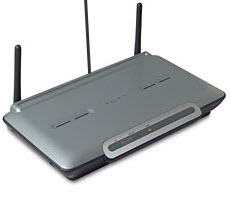
A wireless access point creates or extends a wireless network and Connects Ethernet devices to the network.
Most access points have several Ethernet ports.
Commonly used to extend Wi-Fi coverage on a home network.
Wireless Router
Looks Similar to the WAP (above) but has a DSL /VDSL or cable connection to connect to the Internet in addition to the Ethernet ports and built in Wireless Access point.
Wi-Fi Range Extender/Repeater
 Place in range of the existing Wireless network, and it will take the signal from the network and rebroadcast it, thus increasing the range of the network.
Modern ones plug directly into a mains socket and require no other connections. See Powerline Networks
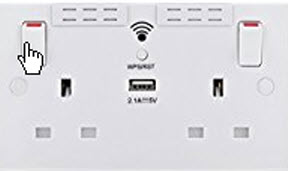
Wireless Electrical Power Sockets
Wireless electrical power sockets are a new introduction to the market and function as wireless repeaters.
They are convenient because they don’t consume a electrical power socket. Here is a picture of a UK socket.
Mesh Wi-Fi
This is a relatively new but very popular technology that provides wide areas coverage and wireless dead spots by using Wireless Access points that work together. See Understanding Wi-fi Mesh Networks
Wi-Fi 5 vs Wi-Fi 6
Wireless devices like routers that you purchase today will either be Wi-Fi 5 or Wi-fi 6.
Generally you will get better performance with Wi-Fi 6 provided that your end devices support it. Wi-Fi is approx 2 times faster than Wi-Fi 5.
Wi-Fi 6 devices are backwards compatible with Wi-fi 5 devices. This means that if you do upgrade to a Wi-Fi 6 router then your old Wi-Fi 5 devices will continue to work
This article explains the benefits of Wi-Fi 6
Install Wi-Fi Network Without Router
You don;t need a wireless router to set up a home wireless network all you need is a Wireless access point.
The router is need if you want to connect your wireless network to the Internet.
Common Questions and Answers
Q- Is it worth upgrading your wireless router to Wi-Fi 6?
A- Only if you need to replace the wireless router.
Q- Does being closer to the router make the connection faster?
A- Yes see Understanding Home Networking Speeds for an example
Q- Is it better to place the wireless router upstairs or downstairs?
A- Upstairs and as high as possible due to the way they spread the wireless signal
Q- Is a Wi-Fi network a LAN (Local Area network)?
A- yes
Q- Can I connect my Wi-Fi network to my Ethernet Network?
A- You can connect your wi-fi network to an Ethernet network using the Ethernet port on your Wireless router or access point
Related Tutorials and Useful Resources:
I am moving to a remote area where internet is slow and expensive. I will have broadband in house. I want to get a wireless hard drive that I can use in house so I can stream films ect to tv, phone and tablet. I was looking at WD 8tb my cloud however I do not want to access it from the internet. can I connect a normal external hard drive to the broad band router and just do it that way.
Yes if the router supports sharing. The mycloud box is a hard drive with file sharing software.
Does that make sense?
rgds
steve
and devices use the 2.5GHz frequency band – just a note could you change this to 2.4GHz please, a small correction on a good article.
Tks for that I think I found them all.
Rgds
Steve
Can a WiFi be used in areas of limited network like in some of the villages where we have limited network to get to internet?
If so how do go about it.
Wi-Fi is a home networking technology and so is very limited in range. For rural areas then 3G and 4G tend to be used.
Rgds
Steve
I would like to set up a home security network with several cameras via WiFi. We also have a few computers and printers that we would like to include. We have no internet access except for a mobile hotspot from Verizon.
Can the cameras be installed and just monitored locally?
Would it be possible to monitor them via my mobile hotspot?
Thanks
Yes they can be installed an monitored locally and you should be able to access via the mobile hotspot depending on the speed will depend on the picture quality.
Rgds
Steve
I have a wireless router which is used by several different devices. I want the devices to be able to see and to talk to each other. I had hoped that this article would show me how but unfortunately it doesn’t.
Hi
If they connect to the same wireless router then they can talk to each other there is nothing you need to do.
How do I know if my WiFi is 2.4 or 5.6 MHz?
I don’t think the phone shows you. If you are the admin for the network you can add the speed as part of the SSID. This is common.
Steve,
I have the typical small home network (home network diagram – https://stevessmarthomeguide.com/build-home-network/) with MAC filtering & encryption. I have been told that as kids get on the home network with their devices they need to be sectioned off (sandbox/virtualized/segmented) for monitoring/protection. I would like to do this, but how is it done? I think I saw one article talking about multiple SSIDs and another one talking about purchasing another router. I am looking for a simple but protective solution.
Thank you for your time and the sharing of your knowledge.
–Kevin
I will look into it and let you know. Can I ask what router do you have and does it have guest access?
Rgds
Steve
Sorry to interject on your dialogue with Steve. After seeing your guest access comment, may I ask a new question.
If my router has guest access, does it mean you can carry out fault finding remotely? The reason I ask, it I have a connection problem after changing my ISP. After set up with new ISP/Router one of my devices is not working 100%. After 6 weeks I have failed to get a solution. They say when I check connection with the router to my home phone with it’s data sim, instead of ISP data source, the rogue device works 100% So it has to be my router settings! It is small feature whereby my Honeywell home heating controls are provided by a real time “outside temp” reading so that control is highly optimised.
No guest access won’t allow that. It looks like you have a port forwarding issue.
https://stevessmarthomeguide.com/understanding-port-forwarding/