
 Today computer networks are everywhere.
You will find them in homes, offices, factories, hospitals leisure centres etc.
But how are they created? What technologies do they use?
In this tutorial you will learn the basic networking technologies, terms and concepts used in all types of networks both wired and wireless, home and office.
[googlead]
Home and Office Networks
The network you have at home uses the same networking technologies, protocols and services that are used in large corporate networks and on the Internet.
The only real difference between an home network and a large corporate network is the size.
A home network will have between 1 and 20 devices and a corporate network will have many thousands.
If you are completely new to networking then the basic course will introduce you to the basic networking protocols used in small home/office networks and on the Internet.
Setting Up and building a Home Network will introduce some basic networking component and show you how to build a home network and connect it to the Internet.
Networking Types and Structures
Networks can be wired or wireless with most networks being a mixture of both.
Wired vs Wireless Networks
Early (pre 2008) networks were predominately wired.
Today however most networks will use a mixture of wired and wireless network.
Wired networks use Ethernet as the data link protocol. This is unlikely to change with the IOT, as IOT devices will be predominantly wireless.
Wired Networks- Advantages and Disadvantages
Wired networks have the following advantages/disadvantages:
Advantages:
- Ethernet ports are found on almost all laptops/PCs and netbooks even on those 8 years old.
- Wired networks are faster than Wireless. Data rates were periodically increased from the original 10 megabits per second, to 1gigabits per second. Most home networks use 10-100Mbps.
- More secure than Wireless
Disadvantages
- Need to Use cable which can be unsightly, difficult to run and expensive.
- Can’t be used easily between buildings (planning etc).
- Note a new technology that uses mains cable overcomes many of these disadvantages. powerline networking is common on home/small office networks
- Not supported on Mobile phones and tablets.
Wireless Networks – Advantages and Disadvantages
Wireless networks use Wi-fi as the data link protocol. However other wireless options are being developed for the IOT (Internet of things). See Wireless networking Technologies for the IOT
Wireless Networks have the following advantages/disadvantages:
Advantages
- Generally easier to set up.
- Can be used both on home and public networks
- No cables required.
- Can be used with mobile phones and tablets.
Wireless Networks Disadvantages
- Generally Slower than wired networks.
- Limited by range.
- Open to eavesdropping.
- Not as secure depending on set up.
Networking Topologies and Layout
There are many different ways network nodes can be connected together. This isn’t normally a consideration in small networks but has networks get larger it becomes more important.
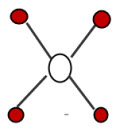 There are many different ways network nodes can be connected together.
Common connection technologies like Wi-Fi, Bluetooth etc are designed to work using a particular network topology.
When designing networks and choosing connection protocols having an understanding of these topologies is important.
Common are:
- Bus
- Ring
- Mesh
- Star
- Hybrid
Each of these topologies has advantages and disadvantages this Network topologies article has a really good overview of each topology along with advantages and disadvantages.
Early Ethernet networks used a bus structure, modern Ethernet networks and Wi-Fi Networks. use a star bus (hybrid) structure.
However both Wi-Fi and bluetooth are being upgraded to support mesh networking.
Networking Topology- Physical vs Logical
How the nodes on a network communicate with each other can be very different to how they are physically interconnected.
Most Home and small office networks use a physical bus topology.
Common logical typologies are Peer to Peer and Client Server.
The web (WWW) is a client server network at the logical level.
Peer to Peer and Client Server Networking
Peer to Peer
in a peer to peer network all nodes are equal and any node can talk to any other node.
No node has any special role. This was the original networking model of windows networking. (windows for Workgroups)- Diagram below:

Advantages and Disadvantages
Advantages:
- Easier to setup
- Not dependent on a single node
- More resilient
- Better distribution of network traffic
- No central administrator required
- Less expensive hardware required
Disadvantages:
- Less secure and more difficult to secure
- More difficult to administer
- More difficult to backup
- More difficult to locate information.
This was the original networking model used in early Windows networks (windows for Workgroups)
A Modern example of Peer to Peer networking is BitTorrent.
Although this networking model isn’t currently popular it could become more popular with the Internet of things (IOT).
Client Server
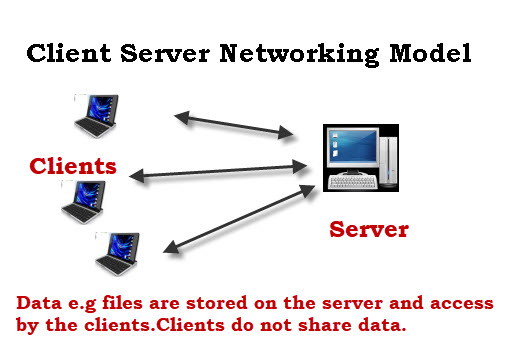
In a Client Server network a server has a special role e.g file server, domain controller, web server etc.
A client connects to a server to use the appropriate services.
This is the networking model used on the web and the Internet and on modern large Windows networks.-Diagram below:
Advantages and Disadvantages
Advantages:
- Easy to find resources as they are on a dedicated node i.e. A server
- Easy to secure
- Easy to administer
- Easy to backup
Disadvantages:
- Servers are a single point of failure
- Expensive hardware required
- Network traffic get concentrated
A Modern example of Client Server networking is the Web. Facebook,Twitter,Google search and many other web services use this networking model.
Network Size
Networks vary considerably in size.The following are commonly used terms:
- PAN -Personal Area Network – Linking local devices e,g, PC to printer
- LAN – Local Area network- links devices in an office or offices
- MAN – Metropolitan Area network – links devices across multiple buildings like a campus
- WAN – Wide area network – links devices across a country/countries.
Networking Levels and Layers and Protocols
A protocol defines a set of rules that govern how computers talk to each other.
Ethernet and Wi-Fi are Data link protocols that are responsible for framing data on the media (cable or wireless).
They can be used for carrying higher level protocols (IP etc)..
Ethernet and Wi-Fi use a physical level address know as the MAC address which is 48 bits.
EUI 64 addresses are MAC addresses with 64 bits will replace MAC addresses on IPV6, 6LoWPAN, ZigBee and other new network protocols. See this Wiki for details.
You can divide networking into distinct levels or layers.
Each level or layer is responsible for a particular function.
The OSI uses a 7 layer model and TCP/IP networks use a 4 layer model.
Because TCP/IP networks are the most common the TCP/IP model is the most important one to understand. The levels are:
- Data link level – e.g. Ethernet, Wi-Fi
- Networking e.g. IP, – IPv4 Address classes and subnetting and IPv6 Explained for Beginners.
- Transport level e.g.TCP, UDP – See TCP vs UDP
- Application level – e.g. HTTP -See HTTP for beginners
See Understanding the TCP/IP protocol suite and TCP port and sockets for details.
Network Addressing
What Is An IP Address?
Every device attached to a network, and the Internet has an IP address.
An Internet Protocol address (IP address) is a numerical label assigned to each device (e.g., computer, printer) participating in a computer network that uses the Internet Protocol for communication –WikI
There are two versions of IP, they are IPv4 and IPv6.
IPv4 has been in use since the start of the Internet, and is deployed across the Internet, and home/corporate networks.
IPv4 uses 32 bits for addressing, however due to the rapid growth of the Internet, all IPv4 addresses have been allocated (as of 2013).
Techniques like NAT (network Address Translation) have extended the life of IPv4 by allowing the use of private IP addresses inside networks.
However IPv4 will eventually be replaced by IPV6 which uses 128 bits for the address, and so can accommodate many more hosts (computers/devices)
The roll out of IPv6 across the Internet is happening slowly, and IPv4 will be with us for many years to come especially in home and small office networks.
As IP6 rolls out they will also be a need to operate with two addresses until migration is complete, and IP4 is discontinued.
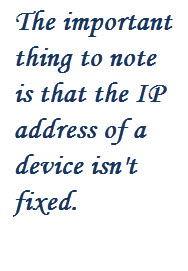
IP addresses are logical addresses, and are assigned by a network administrator or can be auto assigned ( using DHCP).–
The important thing to note is that the IP address of a device isn’t fixed.
Public and Private IP Addresses
Both IPv4 and IPV6 have both public and private address ranges.
The private addresses are used for home/business networks and the addresses aren’t routeable on the Internet i.e. they don’t travel across the internet.
For IP4 the private addresses starts with
10.x.x.x or 192.168.x.x or 172.16.x.x
Public addresses are reachable from anywhere on the internet and are routeable.
See Internal and external IP addresses for more details
IP Address Assignment
Most modern networks use automatic IP address assignment via DHCP with manual assignment only being done in special cases.
For home networks the Internet router or hub usually provides DHCP services for the network.
For larger networks a dedicated DHCP server is normally used.
Most windows machines will auto assign their own address if they fail to find a DHCP server.
This can cause problems see troubleshooting Internet connections.
IP Addresses and Domain Names
Computers use numbers (IP addresses ) but people use names as they are much easier to remember.
When you type in a domain name into your web browser the name is translated into an IP address by a DNS server usually located on the Internet.
[googlead]
Your computer will resolve the name using a name resolving process. See
- Resolving Host names to IP addresses
- DNS lookups Explained
- Understanding DNS
- The DNS structure explained
- DNS Zones Explained
- Understanding the Hosts File
Other Networking Tutorials
- Understanding Binary numbers for Beginners
- TCP vs UDP – What is the Difference?
- Beginners guide to using nslookup
thanks
So interesting and I would love to learn more from you.
Thanks
Hello ,
I would like to know where can I learn more about networking ??
Try this short course
https://stevessmarthomeguide.com/basic-networking-course/
and this
https://docs.microsoft.com/en-us/learn/modules/network-fundamentals/
rgds
steve
hey try youtube channels for networking they are best in it
Thanks Steve!
Thanks for sharing. Its great for amateur learner likes me.
Very intereting, your writ up make sense.
I will like to contact you for personal tutorial .
How possible is it?
You can contact me through my email theozion@yahoo.com
Thanks
Theodore
Hi
Sorry but I don’t offer personal tuition services.
Rgds
Steve
Nice One And Interested.
Hi Steve,
It was very useful since all the basic points are covered.
Thanks
N.Srinivasan
Plz tell me about network access technologies.
This might help
https://stevessmarthomeguide.com/networking-components/
I am also a beginner in networking. So, i was looking for this type of blog. Thanks for sharing this article. This is very informative.
Nice one sir, wish you more greese to your elbow
Thanks for the article Steve
hi steve? have you written any book concerning network?
No afraid I haven’t
Thanks for the nice article. But for me there is one glaring omission: what year was it published? 1999? 2009? 2019? Sorry, but this is a pet peeve of mine, knowing how up-to-date information is likely to be before I invest time in reading an article. I know I can look at dates on the comments, but maybe nobody commented until 20 years after it was written.
Gary
Take your point I forgot that that the updated time only appears on posts and not pages. I will correct it as soon as I can
rgds
steve
This was quite insightful. Simple and explanatory
The following sentence threw me off and I wasn’t able to completely understand what you were trying to say…
“Because TCP/IP networks are the most common this is the one that is the most important to understand. are the , they are:”
are the, they are: … What???
John
Tks for pointing that out. I had to read it several times to understand what it meant. It refers to the TCP/IP model being the most important one to understand.
I’ve edited the text so it makes sense now.
Very simple & easy to understand. Thanx
Thanks for sharing