
 IPv4 has been in use since the start of the Internet, and is widely deployed across the Internet, and home networks.
In this tutorial we will cover the basics of IPv4 Addresses.
You will Learn
- IPv4 address structure
- IPV4 Address classes
- Special and reserved IP addresses
- Broadcast Vasics
Note: If you are new to binary numbers then see the binary numbers for beginners tutorial
The main parts of this tutorial are also covered in this Youtube Video
IPv4 Addresses and Structure
IPv4 uses 32 bits for addressing. The 32 bits are split into 4 bytes and each byte is separated by a dot(.). So it is of this form:
a.b.c.d
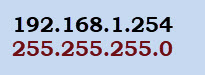
Where the value of a,b,c or d is between 0-255 decimal. A typical IP address appears like this:
192.168.0.1
Networks and Nodes
An IP address has two components- A network component, and a node component.
As an Analogy if you think of the address of your house it is of the  form
form
House Number + Street name e.g 12 King Street.
For computer networks the network number is equivalent to the street name and the house number is the Node Address.
The earlier implementation of IPv4 used address classes to divide the address space into network and node components.
This arrangement was very wasteful of IP addresses and was discontinued, but the terms Class A, B and C networks are still used.
IP4 Address Classes
The address classes divide the address space into addresses that support:
- Large numbers of nodes – Intended for a large organisation – Class A addresses
- Medium number of nodes- Class B addresses
- Small number of nodes- Intended for a small organisation –Class C addresses
For Example Class A addresses would be used by large organisations (e.g. IBM) which had lots of computers (nodes) and so would require a large number of node addresses.
Because there would only be a small number of large organisations then there would only be a small number of class A networks.
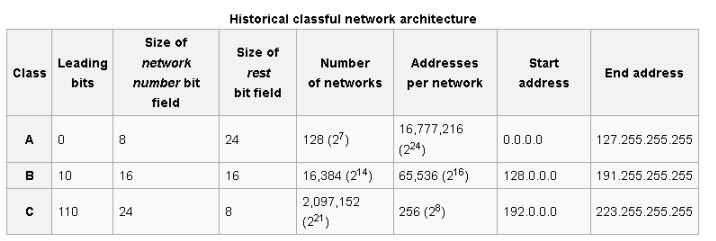
A class A address uses 8 bits for the network Address and 24 bits for node addresses. We can write this as:
Net.Node.Node.Node
Therefore there can only be 256 (28) Class A networks but each network can have 16,777,216 (224) nodes.
Class B network addresses were for medium sized organisations and used 2 bytes (16 bits) for the Network and 2 bytes for node addresses.We can write this as:
Net.Net.Node.Node
Class C network addresses were for small organisations and used 3bytes for the Network and 1 byte for node addresses.
Net.Net.Net.Node
Class D and E are reserved
Here is a useful summary table taken from Wiki
How to Distinguish Class A, Class B Addresses
We need a way of distinguishing a class A address from a Class B ,C,D or E address.
The method used was to use the location on the first 0 bit in the the Most significant bits of the first byte. If the first bit is O then we have a class A Address.
The other 7 bits can be either 0 or 1 (shown as X)
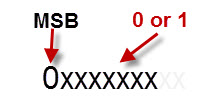
This means that a class A network address is always in the range 0 to 127 – all zeros 00000000, and all ones –01111111 except first 0
With a Class B address the MSB is a 1 and the next one is a 0
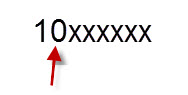
This means that a class B network address is always in the range 128 to 191 – 1000000 and 1011111
With a Class C address the the first two bits are 1’s and the next one is a 0
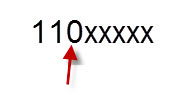
This means that a class C network address is always in the range 192 to 223 – 1100000 and 11011111
This type of addressing is known as classful addressing and resulted in very wasteful IP address allocation.
It was replaced by a newer method called Classless Inter-Domain Routing (CIDR), .-See RFC 1518 and RFC 1519.
The division between Network and node was accomplished using a technique called subnetting.
Private and Special Addresses
Certain IP addresses are not routable on the Internet and are reserved for Internal networks, they are known as private addresses:
- 10.0.0.0 -Class A address
- 172.16.0.0 through to 172.31.0.0 – 16 contiguous class B networks
- 192.168.0.0 through to 192.168.255.0 –256 contiguous class C networks
All ones and All zeros node addresses – IP node addresses like 192.168.0.0 or 192.168.0.255 are not allowed.
This means that a class C network like 192.168.1.0 has 8 bits for the node giving 28 or 256 possibilities.
However due to the all 1s all 0’s rule then we can only have 254 possible nodes.
127.0.0.1 is commonly known as the loopback address, and is used for testing the local IP address stack. A packet addressed to 127.0.0.1 is not sent onto the network but only the IP software stack.
Th entire 127.0.0.0 network is actually reserved, and so you could use any address in that range e.g. 127.0.0.3 would also work.
The link local address range 169.254.0.0 is used to auto assign IP addresses when no DHCP server available.
Unicast, Broadcast and Multicast Addressing
The most common form of addressing is unicast. In this form a message is sent to a single host using it’s IP address.
A broadcast message is sent to all hosts on a network or subnetwork and is created by setting the the node part of the IP address to all 1’s.
A sender sends a single message and all hosts on the network receive it.
To send a broadcast to all hosts on the Class C network 195.1.1.0 you would send it to address 195.1.1.255.
Note: Broadcasts messages do not go through routers.
Multicasting lets you send message to a group of nodes. To receive a multicast message a node must register its interest. Muticast messages are sent using the Class D address range 224.0.0.0 to 239.255.255.255
Note: Routers are responsible for propagating and copying multicast messages. See Understanding Multicasting
SubNetting
Because of the way networks work having a single network with thousands of hosts isn’t practical.
It is equivalent to have a street with thousands of houses on it. Just imagine trying to get on to the street in the morning to go to work.
Therefore a technique called subnetting was devised that allows you to split a network into smaller networks know as subnets. – Subnets and subnet Masking explained.
Summary
IPv4 addresses use 32 bits are a written using dotted decimal notation. Address classes identify the network and node components of an IP address.
Videos
References and resources:
Written note was amazing, got something.
Thank you
hi
in Classful network architecture table why number of networks in class A are (2 ^ 7) while number of network bits equals to 8 ?
Also for classes B and C
your website is very useful.Thanks a lot
I see the confusion.
A calls A network using the first 8 bits. However the MSB is always 0 so that only leaves 7 bits for the network number which is 0 to 127. So a class A address always start with a number between 0 and 127
Hope that makes sense
Rgds
Steve
Nice and simple explanation!